
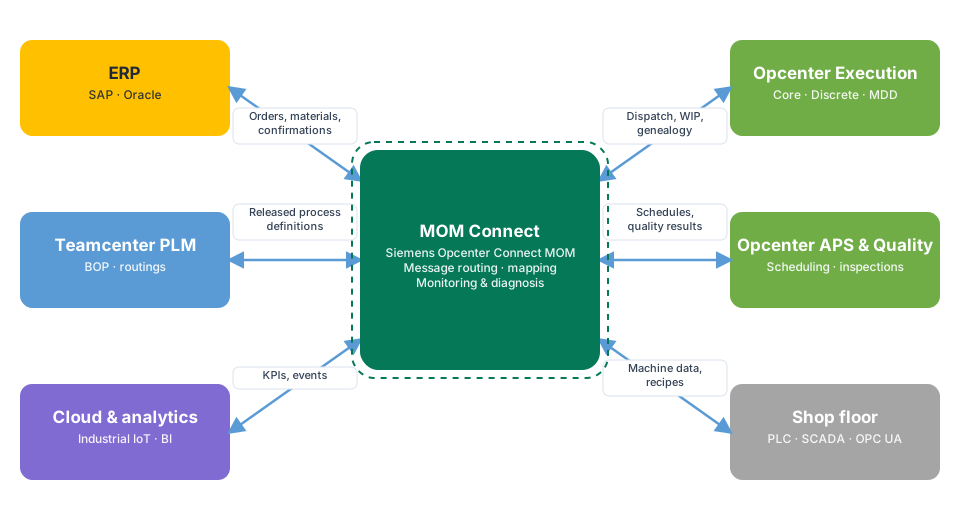
An MES only delivers its full value when it is connected to the business. Work orders need to arrive from ERP, and production confirmations, material consumption and scrap need to go back, accurately and on time. For plants running Siemens Opcenter, MOM Connect (Siemens Opcenter Connect MOM) is the Siemens integration layer designed for exactly this job.
Our team has hands-on experience delivering MOM Connect integrations between Opcenter and ERP. This guide shares how we approach them and what makes them succeed.
What is MOM Connect?
MOM Connect is an integration layer for the Siemens Opcenter portfolio. Instead of building separate point-to-point interfaces between each Opcenter application and each enterprise system, MOM Connect sits in the middle and handles:
- Message routing between Opcenter applications and external systems such as ERP, PLM and the shop floor
- Mapping and transformation between the data formats of each system
- Monitoring and diagnosis of every message, with the ability to find and reprocess failures
- Normalization of data so that every system receives consistent, standardized information
Why use an integration layer instead of point-to-point interfaces?
Point-to-point interfaces look quick at first, but every new system or site multiplies the number of connections to build, test and support. A central integration layer such as MOM Connect gives you:
- One place to monitor all MES integrations
- Reusable mappings when you add lines, plants or Opcenter applications
- Less custom code inside the MES and ERP
- Clear ownership: integration logic lives in the integration layer, not scattered across systems
The MES–ERP interfaces that matter most
Most MES–ERP projects revolve around a core set of business flows:
- Master data: materials, and where needed BOMs and routings, from ERP (or PLM) to MES
- Order release: production or process orders from ERP to MES
- Material staging and consumption: what was issued to production and what was actually used
- Production confirmations: good quantities, operation completions and labor or machine time back to ERP
- Scrap and rework: losses and their reasons reported to ERP for costing
- Goods receipts: finished goods posted to inventory
- Quality results: inspection results and holds where ERP quality processes are used
Start by agreeing which system owns each object and which events trigger each message. This single step prevents most later disputes.
How we deliver a MOM Connect integration
- Process mapping. Walk through order-to-confirmation with ERP, MES and shop-floor users, and document each interface: trigger, payload, frequency and volume.
- Data ownership and mapping. Define the master system for every field, units of measure, plant and work-center mapping, and status codes.
- Build and configure. Configure MOM Connect routing and mappings, and connect to ERP through its standard interfaces.
- Error handling. Decide what happens when a message fails: retry, hold, alert or manual reprocessing. Make failures visible to the right people.
- End-to-end testing. Test with real ERP test systems, realistic volumes, and failure scenarios such as ERP downtime or duplicate messages.
- Go-live and hypercare. Monitor message flows closely in the first weeks and tune alerts.
Best practices from our projects
- Design for failure. ERP will sometimes be unavailable. Messages must queue and be reprocessed safely, without duplicates.
- Make every message traceable. Operators and ERP users should be able to see whether a confirmation was sent, received and posted.
- Keep business logic out of the pipes. Mappings belong in the integration layer; business rules belong in MES or ERP.
- Plan for volume. High-volume plants can produce many confirmations per minute. Test throughput early.
- Write an operations runbook. Support teams need clear steps for the most common errors.
Common pitfalls
- Starting the build before data ownership is agreed
- Testing only the "happy path"
- Mismatched units of measure and plant codes between systems
- No one assigned to watch failed messages after go-live
Frequently asked questions
Does MOM Connect work with SAP?
Yes. MOM Connect is used to connect Opcenter with ERP systems including SAP, through the ERP's standard interfaces.
Can MOM Connect also connect PLM and the shop floor?
Yes. Besides ERP, it can connect Opcenter with PLM, other manufacturing systems, shop-floor devices and cloud applications.
When should we use another integration platform instead?
If your landscape is broader than the Opcenter portfolio, for example many SaaS applications or a corporate iPaaS standard, platforms such as SnapLogic or eQube may complement or replace MOM Connect for some interfaces. See our integration services.
Planning a MES–ERP integration? Our team has hands-on MOM Connect experience and can help you design, build and support it.