
Engineering decides what to build; ERP plans, buys and costs it. When released parts, BOMs and engineering changes in PLM do not reach ERP accurately and quickly, the result is wrong purchases, outdated BOMs and costly rework. This becomes even more pressing when companies move to SAP S/4HANA and have to rebuild their PLM–ERP interfaces.
eQube, from eQ Technologic, is a low-code platform for integration, data migration and analytics that is widely used around Teamcenter. Our team has strong hands-on experience with eQube, and this guide shares how we use it to connect Teamcenter and S/4HANA.
What is eQube?
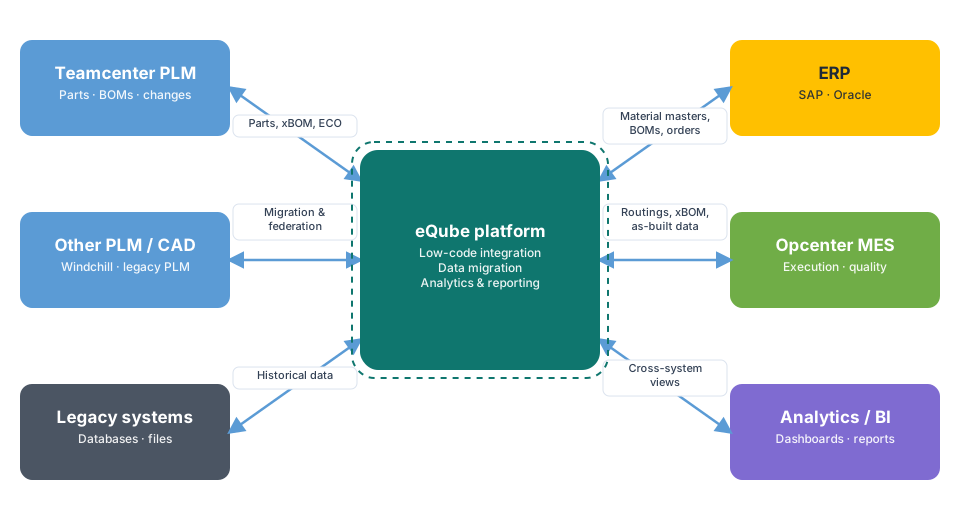
eQube provides a model-driven, low-code approach to connecting enterprise systems. Instead of writing large amounts of custom interface code, integration services are configured and reused. Typical uses include:
- Integration between PLM, ERP, MES and other enterprise applications
- Data migration from legacy PLM and other systems
- Analytics and reporting across multiple systems through federated views
Which data flows from Teamcenter to S/4HANA?
- Parts to material masters: new and changed parts create or update materials in S/4HANA
- BOMs: released engineering BOMs, and where used, manufacturing BOMs, transferred with the right plant and usage data
- Documents: links to drawings and specifications
- Engineering changes: change orders that control when new revisions become effective in ERP
Some data, such as plant-specific settings or procurement status, may flow back from ERP to PLM so engineers can see it.
How we deliver an eQube PLM–S/4HANA integration
- Define the business rules. When is a part ready for ERP? Which BOM types go to which plants? How are changes made effective?
- Map the data model. Teamcenter attributes to S/4HANA fields, units of measure, material types, plants and BOM usage.
- Build the integration services in eQube. Configure the transfer of parts, BOMs, documents and changes, using standard SAP interfaces on the S/4HANA side.
- Handle validation and errors. Validate data before sending it, and report clearly what succeeded or failed, so engineers and ERP users can act.
- Migrate and reconcile. During an S/4HANA move, migrate existing data and reconcile PLM and ERP so they start in sync.
- Test end to end and go live. Test with real test systems, including complex BOMs and change scenarios, then monitor closely after go-live.
Best practices from our projects
- Agree on the "release" trigger. Only released, approved data should reach ERP.
- Keep plant logic explicit. Multi-plant rules are a common source of errors; document and test them carefully.
- Make results visible. A transfer report for every change saves hours of investigation.
- Reuse services. Build integration services that can be reused for new plants or systems, a key benefit of the low-code approach.
- Treat the S/4HANA migration as an opportunity to retire old custom interfaces and clean up master data.
Common pitfalls
- Transferring work-in-progress engineering data instead of released data
- Unclear ownership of fields that both engineering and ERP want to edit
- Underestimating BOM complexity: variants, phantom assemblies and alternative items
- No reconciliation after migration, so systems start out of sync
Frequently asked questions
Can eQube integrate Teamcenter with MES as well as ERP?
Yes. eQube can also deliver released BOMs, routings and as-built data between PLM and MES such as Siemens Opcenter.
How does eQube compare with Teamcenter Gateway (T4S)?
Both connect Teamcenter with SAP. Teamcenter Gateway is Siemens' native integration suite; eQube is a low-code platform that also covers data migration and cross-system analytics. The right choice depends on your landscape, and we help you decide.
Can eQube help with an S/4HANA migration?
Yes. Besides ongoing integration, eQube is often used to migrate and reconcile engineering data during the move to S/4HANA.
Connecting Teamcenter with SAP S/4HANA? Our team has strong eQube experience and can help you design, build and support the integration.